

Shopping guide
Streamline Endpoint Control Across Distributed Infrastructures
An in-depth technical evaluation of NinjaOne for internal IT departments and managed service providers seeking to consolidate tool sprawl, automate patch cycles, and secure distributed fleets.
01
Meet the merchant
Core Capabilities: Unified Endpoint Management and RMM
Modern IT environments are rarely uniform. System administrators routinely oversee fleets comprising Windows workstations, macOS laptops, Linux cloud instances, ChromeOS student computers, and company-issued mobile hardware. Traditional endpoint management relied on disparate toolsets for monitoring, deployment, and configuration, producing operational blind spots and driving up license costs. NinjaOne addresses this fragmentation by unifying Remote Monitoring and Management (RMM) and Mobile Device Management (MDM) within a centralized, browser-based administrative dashboard.
The platform provides near-instantaneous visibility into device health, software inventories, hardware configurations, and system metrics without imposing a noticeable performance burden on client machines. IT teams can execute script-based automations, configure granular policy hierarchies, enforce compliance benchmarks, and monitor performance anomalies in real time. Because the agent connects seamlessly across corporate networks, home offices, and remote worker configurations, organizations maintain continuous visibility regardless of endpoint physical location.
Furthermore, NinjaOne integrates asset lifecycle tracking, real-time alerting, and automated corrective actions. When an endpoint drifts from established compliance thresholds—such as disabled firewalls, outdated encryption configurations, or halted security services—the system can automatically initiate remedial scripts or alert support engineers before end-user productivity is impacted.
02
Before you order
Automated Patching and Vulnerability Remediation
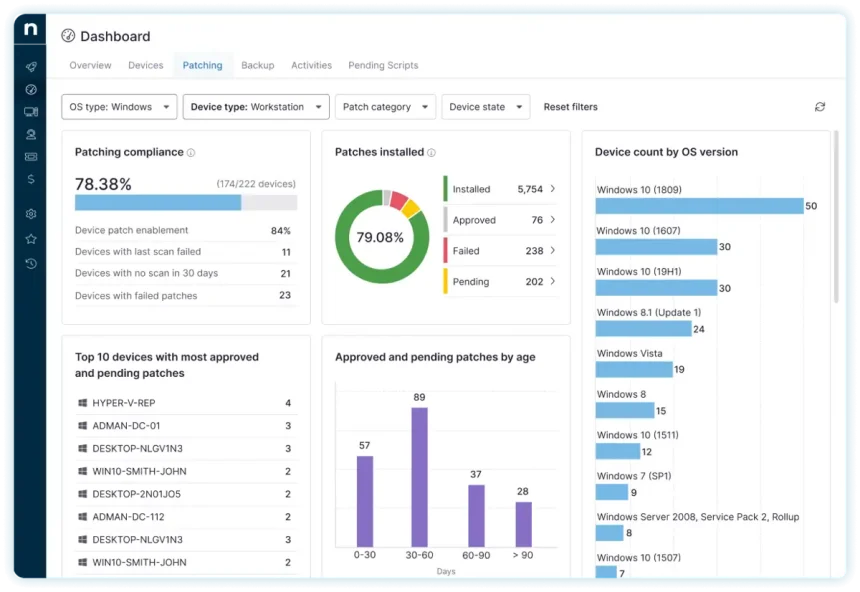
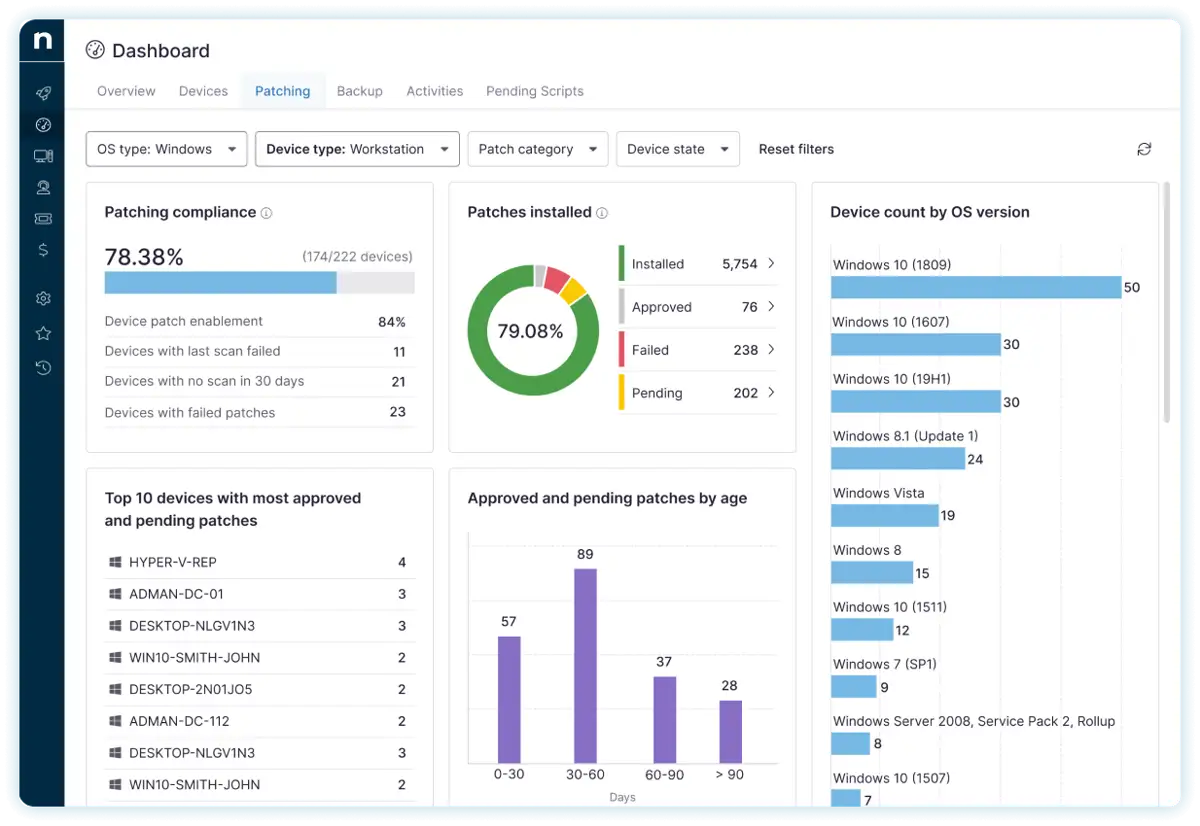
Unpatched operating systems and third-party software vulnerabilities represent one of the primary vectors for enterprise security breaches. However, manually identifying, testing, and deploying patches across hundreds or thousands of distributed endpoints is both resource-intensive and prone to human error. NinjaOne resolves this challenge through autonomous patch management backed by Patch Intelligence AI, which automates update approvals, scheduling, and deployment routines across major operating systems and common enterprise applications.
The platform eliminates the need for maintaining dedicated local distribution servers or configuring complex VPN conduits for remote systems. Patches can be delivered peer-to-peer or directly over cloud connections, ensuring field machines receive critical zero-day fixes promptly. Granular scheduling controls enable administrators to define maintenance windows that align with regional office hours, avoiding disruption during peak business activities while enforcing mandatory reboots when security fixes require system restarts.
In addition to standard operating system updates, NinjaOne continuously scans for third-party application vulnerabilities. By utilizing pre-tested software catalogs and automated rollback safeguards, IT personnel can drastically compress patch rollout cycles—reducing remediation timeframes from days or weeks to mere hours—while minimizing the risk of deployment-induced application crashes.
Data Protection, Backup, and Cross-Platform Remote Access
A resilient endpoint management framework requires integrated disaster recovery and hands-on diagnostic capabilities. Rather than licensing external third-party software for day-to-day helpdesk support and disaster recovery, NinjaOne embeds native cloud backup and ultra-low-latency remote control directly into the core management console. This architectural consolidation reduces administrative context switching and accelerates problem resolution.
The backup module delivers end-to-end data protection for physical endpoints, servers, and cloud productivity platforms, including native backup coverage for Microsoft 365 and Google Workspace environments. Administrators can define customized backup cadence schedules, apply retention policies compliant with industry regulatory mandates, and initiate single-file or bare-metal system restores directly from the cloud console. When ransomware or critical hardware failures occur, recovery protocols can be executed rapidly without dispatching technicians on site.
Complementing data protection, NinjaOne’s remote control module facilitates one-click administrative access to active user sessions. Support technicians can establish encrypted cross-platform connections in seconds to troubleshoot issues, transfer files, inspect registry configurations, and interact with background command shells. Because these capabilities operate within an established Zero Trust security posture featuring multi-factor authentication and detailed session audit logging, organizations maintain stringent security adherence throughout every support engagement.
Evaluating Fit: Enterprise IT vs. Managed Service Providers
When selecting an IT operations platform, buyers must evaluate how well the platform scales against organizational structure. NinjaOne accommodates two distinct operational paradigms: internal enterprise IT departments seeking centralized governance and Managed Service Providers (MSPs) requiring multi-tenant partition architecture, customer-specific billing hooks, and delegated role access.
For enterprise IT departments, the platform serves as a unifying management layer that bridges helpdesk operations, infrastructure monitoring, and security telemetry. Deep integrations with industry-standard solutions such as CrowdStrike, SentinelOne, Microsoft Intune, and ServiceNow allow organizations to modernize their endpoint management without displacing core investments in existing enterprise security fabrics.
For MSPs, multi-tenant segmentation enables service teams to manage hundreds of client organizations from a centralized console while maintaining strict data separation. Pre-built PSA integrations, automated ticketing workflows, and standardized policy templates empower service providers to onboard new client accounts quickly and deliver consistent service level agreements (SLAs). Prospective buyers across both segments should utilize NinjaOne’s 14-day free trial or request a tailored environment demonstration to test agent deployment speeds, script execution reliability, and interface responsiveness firsthand.
- Inventory your current endpoint counts across workstations, servers, and mobile devices before requesting licensing quotes.
- Verify integration compatibility with existing security layers such as CrowdStrike, Microsoft Intune, or SentinelOne.
- Confirm deployment prerequisites, custom script libraries, and compliance requirements like SOC 2, ISO 27001, or FedRAMP.
03
FAQ
What operating systems does NinjaOne support?
NinjaOne provides extensive cross-platform endpoint coverage, supporting Windows workstations and servers, macOS, major Linux distributions, ChromeOS, and mobile devices running iOS and Android.
How does NinjaOne handle third-party software patching?
NinjaOne includes an automated patching engine that continuously identifies missing updates across a vast catalog of popular third-party software applications and operating systems, deploying updates without requiring local server infrastructure.
Does NinjaOne offer a free trial?
Yes, prospective buyers can evaluate NinjaOne through a full-featured 14-day free trial or schedule a live product demonstration to test management capabilities on their own test devices.
How is NinjaOne priced?
NinjaOne utilizes a per-device, subscription-based pricing model tailored to the specific modules you select (such as RMM, Backup, or Ticketing). Prospective customers should contact NinjaOne sales or initiate a trial to receive an exact quotation reflecting their fleet size and requirements.
What security and compliance standards does NinjaOne satisfy?
NinjaOne adheres to rigorous security standards, maintaining certifications and compliance frameworks including SOC 2, ISO 27001, GovRAMP, and FedRAMP Moderate Rev 5 authorization.
Disclosure: this article may contain affiliate links. We may earn a commission if you purchase through these links, at no extra cost to you.