
Shopping guide
Centralize Device Operations, Autonomous Patching, and Data Protection
An editorial assessment of NinjaOne's unified IT management platform, covering real-time endpoint visibility, cross-OS monitoring, automated remediation, and native data protection for modern enterprises and MSPs.
01
Meet the merchant
Core Capabilities: Endpoint Visibility, RMM, and Remote Control
Modern enterprise IT operations and managed service providers face unprecedented endpoint diversity. Managing distributed workforces requires continuous, real-time insight into laptops, desktops, servers, virtual machines, and network equipment. NinjaOne addresses this complexity by consolidating core Remote Monitoring and Management (RMM) functions into a streamlined, high-responsiveness cloud console. Instead of toggling between standalone device inventories, network probes, and remote connection software, technicians gain immediate hardware telemetry, software status, and performance diagnostics from a unified dashboard.
A critical pillar of the platform is its low-latency, cross-platform remote control capability. Support teams can initiate single-click remote sessions across Windows, macOS, and Linux endpoints without forcing end users through complex connection handshakes. Furthermore, NinjaOne allows administrators to execute behind-the-scenes troubleshooting—such as querying running processes, managing services, reviewing event logs, and initiating command-line scripts—without interrupting active user sessions. This non-disruptive remediation dramatically shortens mean time to resolution (MTTR) while preserving end-user productivity.
Complementing endpoint control is an integrated service desk and asset documentation framework. Automated ticketing captures relevant device hardware and software health metrics directly into service tickets, providing tier-one and tier-two technicians with instant context. Because platform telemetry directly ties into user support workflows, organizations reduce operational friction and eliminate the manual data entry typical of disconnected ticketing solutions.
02
Before you order
Security and Resilience: Autonomous Patching, MDM, and Backup
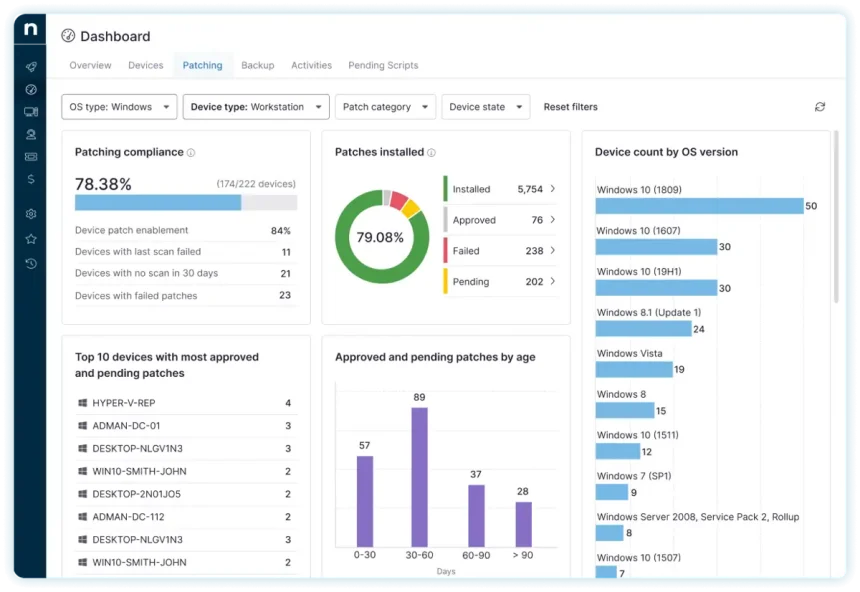
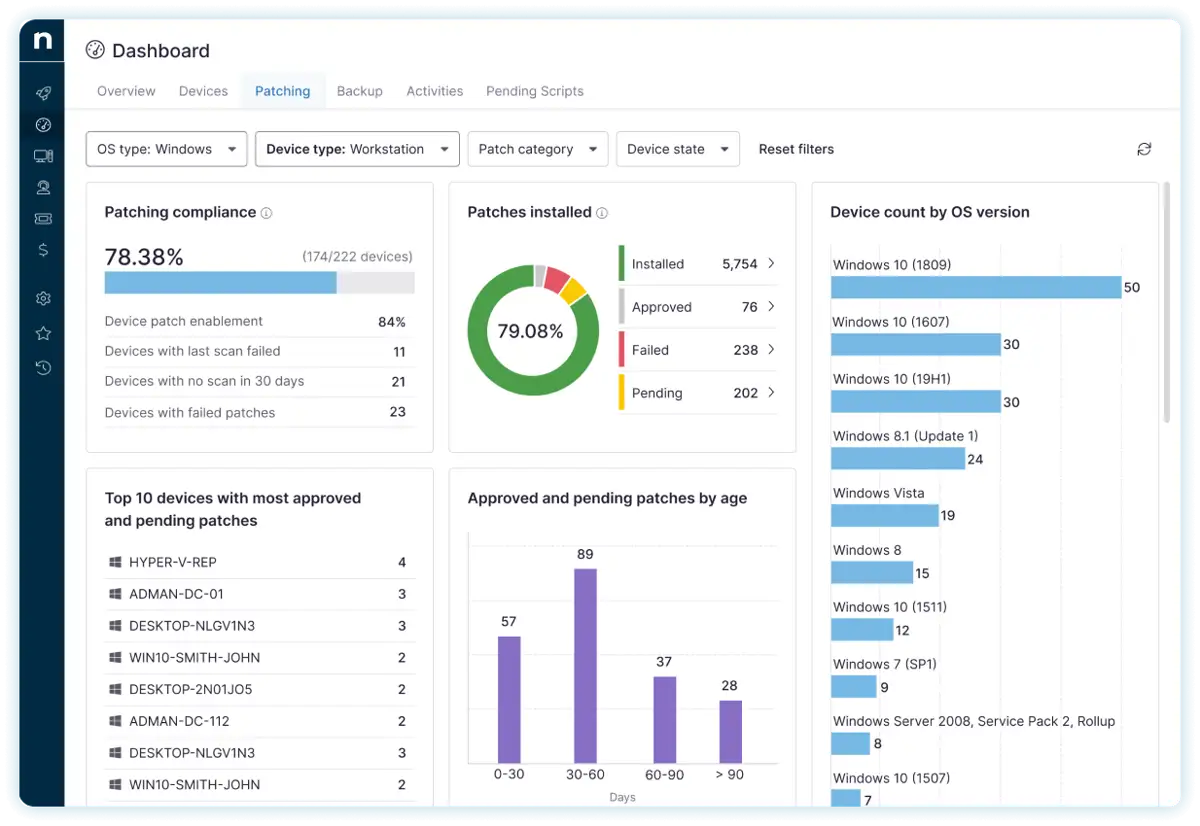
Endpoint vulnerabilities represent the primary vector for malware and zero-day intrusions. NinjaOne counters this exposure through Autonomous Patch Management, an automated updating engine powered by Patch Intelligence AI. The system identifies missing operating system updates across Windows, macOS, and Linux, alongside critical patches for hundreds of common third-party software applications. IT administrators can define granular scheduling windows, automated reboot policies, and phased rollouts that thoroughly test update stability before enterprise-wide distribution, effectively reducing patch deployment cycles from days to minutes.
As enterprise mobility accelerates, NinjaOne extends centralized policy controls to Android and Apple mobile devices through integrated Mobile Device Management (MDM). Fast enrollment workflows and configuration profiles allow security teams to enforce passcode compliance, deploy necessary corporate apps, and remotely lock or wipe lost or compromised hardware. Coverage for ChromeOS endpoints ensures that educational institutions and modern cloud-first enterprises maintain complete visibility across lightweight client fleets without creating operational blind spots.
Resilience is fortified with integrated Device and SaaS Backup. NinjaOne delivers hybrid backup capabilities directly inside the endpoint management console, safeguarding critical files, folders, and full system images on servers and workstations. Organizations can complement on-premises and off-site endpoint protection with cloud-to-cloud backup for Microsoft 365 and Google Workspace, protecting mission-critical collaboration suites against accidental deletion, insider threats, and ransomware. Prior to finalizing procurement, prospective buyers should review organizational data retention policies, cloud storage allotments, and recovery objectives directly with NinjaOne specialists.
Deployment Evaluation: Structuring Workflows for Internal IT vs. MSPs
When selecting an IT operations platform, team alignment and tenant architecture dictate long-term success. NinjaOne offers purpose-built configurations tailored either for single-organization internal IT departments or multi-tenant Managed Service Providers (MSPs). Internal IT departments benefit from scalable automation, centralized Active Directory/cloud identity alignments, and deep integration with existing enterprise tooling such as SentinelOne, CrowdStrike, and ServiceNow. Automation templates and script libraries allow smaller internal teams to operate with the capacity of much larger infrastructure operations.
For MSPs, multi-tenancy remains essential. NinjaOne provides client-by-client data isolation, custom branding, granular role-based access control (RBAC), and automated billing integration. Service providers can manage thousands of unique customer sites through segregated parent-child console views while maintaining centralized policy enforcement and standardized patch baselines. The platform’s flexible scripting engine enables MSPs to package proprietary automated maintenance routines as high-margin managed service offerings.
Prospective purchasers should begin their evaluation by scoping out total endpoint counts, expected growth, and the specific module sets required (such as patch management, cloud backup, or documentation). Taking advantage of a 14-day free trial allows teams to run live proof-of-concept testing in their own network environment. Because software packaging, seat minimums, and volume-based discounts vary, teams must verify final commercial terms, licensing schedules, and support tier commitments directly on the merchant platform prior to agreement execution.
- Assess endpoint OS diversity across your organization (Windows, macOS, Linux, Android, iOS, and ChromeOS) against required agent capabilities.
- Evaluate compliance and storage requirements for integrated endpoint, server, and SaaS data protection across Microsoft 365 or Google Workspace.
- Request custom tier pricing and test platform automation rules during an available 14-day proof-of-concept trial.
03
FAQ
What core operating systems does NinjaOne support?
NinjaOne provides extensive monitoring, management, and remediation capabilities across Windows, macOS, and multiple Linux distributions. It also includes Mobile Device Management (MDM) for iOS and Android, as well as dedicated fleet coverage for ChromeOS devices.
How does NinjaOne handle software and OS patch management?
NinjaOne features Autonomous Patch Management powered by Patch Intelligence AI. It automates vulnerability detection, scheduling, approval policies, and silent deployment for major operating systems as well as an extensive library of popular third-party business applications.
Is NinjaOne designed for internal IT departments or MSPs?
NinjaOne accommodates both deployment models. It offers enterprise-grade single-tenant workflows and IT service desk integration for internal corporate departments, alongside a robust multi-tenant architecture with client isolation and PSA integration designed for managed service providers.
Can I test NinjaOne before purchasing a contract?
Yes. NinjaOne offers a 14-day free trial and on-demand demonstrations, allowing IT leaders to test agent deployment, automation policies, remote control, and patching across test devices prior to entering into a commercial agreement.
Where can I confirm pricing, add-on modules, and licensing terms?
Because NinjaOne tailors pricing to managed endpoint counts and specific module selections (such as backup or specialized security capabilities), prospective buyers must contact sales or submit a quote request on the official NinjaOne website to review final pricing and contract terms.
Disclosure: this article may contain affiliate links. We may earn a commission if you purchase through these links, at no extra cost to you.